Remarketing Ads for Small Business: How to Win Back Website Visitors
Remarketing Ads for Small Business: How to Win Back Website Visitors
Someone lands on your website, reads your services page, maybe even starts filling in a quote form, then closes the tab and never comes back. It happens dozens of times a week for most Australian small businesses, and almost none of them do anything about it. They pour next month's ad spend into chasing brand new strangers instead. That's the mistake at the heart of most poorly performing remarketing ads for small business owners: the visitor who already raised their hand is sitting right there, cheaper and easier to convert than anyone new, and the tools to reach them again take about twenty minutes to switch on.
What Is Remarketing and Why Does It Convert So Well?
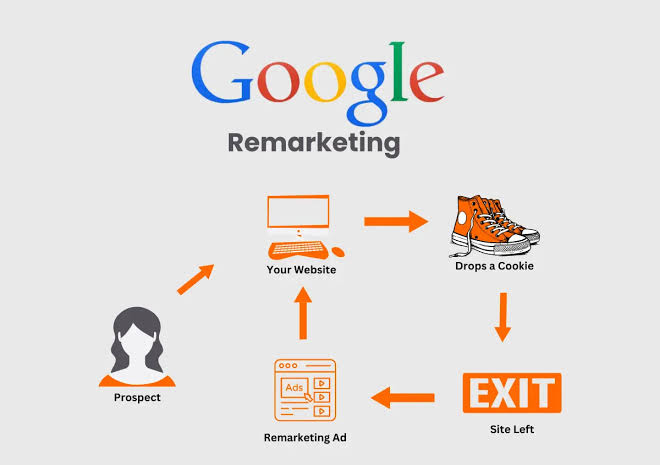
Remarketing shows your ads specifically to people who've already visited your website or app, rather than to a cold audience who's never heard of you. It works because these people have already cleared the hardest part of the sales funnel: they know who you are and what you sell.
Google's own remarketing support documentation explains that remarketing lets you reconnect with past visitors as they browse other sites, use apps, or search on Google again, using a tag placed on your site to build that audience automatically. Meta runs on the same logic through its pixel. Someone who compared three tradies' websites last week and picked yours is a far warmer prospect than someone scrolling Facebook who's never searched for your service. You're not introducing yourself twice. You're reminding someone who already leaned in.
Where Most Small Business Ad Budgets Go Wrong
Most SMB owners set up a Google Ads or Meta campaign, watch the clicks roll in, and stop there. New clicks feel like progress, so the budget keeps flowing toward new eyeballs month after month. Meanwhile the people who almost converted, the ones who added a product to their cart, read your pricing page twice, or bailed out of a contact form, disappear without a second touch.
This isn't a knowledge gap about advertising in general. Plenty of business owners we work with at Searchline run competent Google and Meta campaigns and still skip this step, simply because nobody told them the audience already existed inside their own account. If you're still working out how much to spend on ads in the first place, our guide on setting your Google Ads budget is a useful starting point before you split spend between new and returning traffic.
How Do You Set Up Remarketing on Google Ads?
You set up Google remarketing by adding a small tag to your website that tracks visitors, then building an audience list from that tag and applying it to a campaign. The whole process runs inside Google Ads and Google Analytics, and most small businesses can have a basic list live within a day.
Here's the process in order.
Install the Google Ads tag (or link an existing Google Analytics property) across your whole website so visitor activity gets tracked from day one.
Build a remarketing list in Google Ads under Audience Manager, starting simple: "all website visitors" in the last 30 days is a solid first list.
Add a second, more valuable list for people who visited high-intent pages, such as a pricing page, booking form or checkout, since these visitors convert at a noticeably higher rate.
Create a new campaign, or add an ad group to an existing one, and apply your remarketing list as the targeting audience instead of (or alongside) keyword or interest targeting.
Set a lower bid than your cold-audience campaigns to start, since remarketing audiences typically need less spend to win the same result, then adjust based on performance after two to three weeks.
Google's remarketing list settings let you keep an audience live for up to 540 days, which means a visitor from six months ago can still see your ad if you set the list up that way. Most small businesses don't need anywhere near that long a window, but it's useful to know the ceiling exists.
Turning On Custom Audiences in Meta Ads Manager
Meta's version works through the Meta Pixel (or the Conversions API for businesses moving away from cookies), tracking who visits your site so you can build a Custom Audience from that traffic inside Ads Manager.
Once your pixel is firing correctly, go into Audiences within Ads Manager and create a new Custom Audience sourced from your website. Meta's Custom Audiences documentation confirms you can set the lookback window anywhere from 1 to 365 days, so you can build a tight, recent list of last week's visitors or a broader one covering the past year. Start with a 30 or 60-day website visitor audience, then layer in a separate audience for people who added items to cart or started checkout if you sell online. If you haven't set up Meta advertising at all yet, our beginner's guide to Facebook and Instagram ads covers the account and pixel basics first.
Why Bother When the List Is Small?
A small list still outperforms cold prospecting on a dollar-for-dollar basis, because you're not paying to explain who you are all over again. Even a few hundred warm visitors, shown a sharper offer or a reminder ad, tend to produce a better cost per lead than the same spend on strangers. Run it alongside your existing campaigns, and give it its own modest daily budget so it doesn't get lost inside a bigger account.
One practical note for Australian businesses: tracking website visitors for advertising purposes falls under general privacy expectations rather than a special remarketing rule, so keep a clear, accessible privacy policy that discloses tracking and third-party ad tools, and make sure your cookie consent banner reflects what Google and Meta are actually collecting on your site.
Common questions
Does remarketing cost more than regular ads?
No, usually less. Because you're targeting people who already know your business, click-through and conversion rates tend to be higher than cold campaigns, which pulls your cost per result down even though you're bidding in the same auction.
How many website visitors do I need before remarketing is worth it?
There's no strict minimum, but most advertisers see workable results once a list holds a few hundred people. A low-traffic site might take a few weeks to build that up, which is fine. Start the tag now so the list is ready when you need it.
Can I run remarketing on Google and Meta at the same time?
Yes, and most small businesses should. They reach people in different places using different tags (the Google Ads tag or Analytics for Google, the Meta Pixel for Facebook and Instagram), so running both simply gives you more chances to stay in front of someone who already showed interest.
Remarketing isn't a bonus feature to add once the rest of your marketing is sorted. It's one of the fastest wins available inside an account you're already paying for, and most of the setup takes less time than writing the ad copy itself. Open your Google Ads or Meta account this week, check whether a tag is already running, and build your first list before your next campaign goes live.